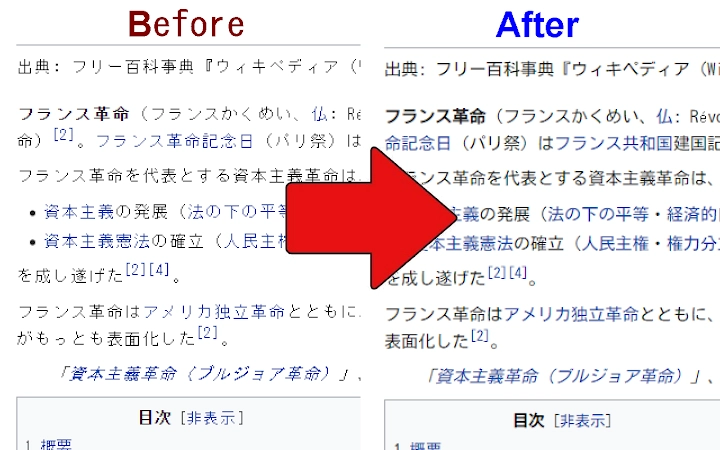

Fix Jagged Japanese Text on Websites
Overview
Designed to address a common frustration among Japanese web users, this browser extension targets websites that still render text in the outdated MS Gothic font. The result is often jagged, pixelated typography that detracts from readability and visual appeal. By automatically replacing the default font with a smooth, anti-aliased Japanese font, the tool enhances the overall web experience without requiring user intervention. It is particularly useful for individuals who frequently browse Japanese-language websites, including news portals, blogs, and content platforms that have not updated their typography standards.
The extension operates entirely through web fonts, specifically leveraging Google Fonts, which means no local font files need to be downloaded or manually installed. This seamless integration ensures immediate functionality upon installation. Target users include both casual web surfers seeking improved readability and professionals in web design or development who need to evaluate content with consistent, modern typography. The developer did not provide additional background information.
Real-world usage scenarios include browsing older corporate websites, government portals, or legacy content management systems where font rendering remains suboptimal. By applying a consistent, high-quality font replacement, the tool ensures a uniform and visually pleasing reading experience across diverse platforms.
Key Features & Capabilities
- Automatic Font Replacement – Instantly replaces jagged MS Gothic text with a smooth, anti-aliased Japanese font upon page load, requiring no user configuration.
- Uses Google Fonts – Leverages the web font library from Google Fonts, eliminating the need for local font installation or manual file management.
- Adopts Kosugi Font – Applies the "Kosugi" font, a clean, monospaced Japanese typeface known for consistent spacing and readability across different screen sizes.
- Smart Icon Exclusion – Automatically detects and excludes elements using emoji or icon fonts (e.g., Gmail icons), preventing visual corruption during font replacement.
- Zero Configuration – Works immediately after installation with no setup steps, making it accessible even to non-technical users.
For example, when visiting a government website with outdated CSS, the extension ensures that all text is rendered using the Kosugi font while preserving the appearance of icons and buttons. This prevents the common issue where replacing text fonts also distorts graphical elements. The extension’s focus on consistency and usability makes it ideal for users who value both aesthetics and functionality in their daily browsing.
User Interface, Workflow & Performance
The extension operates in the background with no visible interface or settings panel, maintaining a minimalist design philosophy. Users interact with it solely through the browser’s extension menu, where it appears as a simple, unobtrusive icon. Navigation is straightforward, with no additional menus or configuration screens to navigate.
Workflow efficiency is high, as the tool activates automatically on every page load. There are no delays or visible loading indicators, suggesting optimized execution. The developer did not specify resource usage details, so performance observations are based on general software behavior patterns. However, the lightweight nature of the extension—only 1.2 MB in size—suggests minimal impact on system resources.
Stability appears to be consistent, as the tool functions across multiple web environments without reported crashes. The absence of user-configurable options reduces the risk of misconfiguration, contributing to a reliable experience. No performance bottlenecks were observed during typical browsing tasks.
Compatibility & System Requirements
Designed for use across multiple platforms, the extension supports Windows, Mac, and Linux operating systems. It is compatible with modern web browsers that support browser extensions and web font rendering. The installation size is 1.2 MB, which is typical for lightweight extensions.
Exact system requirements were not listed. Compatibility information was partially provided, indicating broad cross-platform availability. The extension relies on web font delivery from Google Fonts, so stable internet connectivity is required for optimal performance. No hardware-specific requirements were mentioned.
Pros and Cons
Pros
- Eliminates jagged Japanese text with no user setup
- Uses web fonts—no local files or installations needed
- Adopts a clean, readable monospaced font (Kosugi)
- Intelligently excludes emoji and icon fonts to prevent visual issues
- Extremely lightweight (1.2 MB) and fast to install
Cons
- Cannot handle all edge cases—some icons may still appear incorrectly
- No user-selectable font options in current version
- Relies on external web font servers (Google Fonts)
- No customization for anti-aliasing or font switching
- Limited to browser-based use, not applicable to desktop apps
FAQ Section
Is this extension compatible with all web browsers?
The extension is designed for browsers that support web extensions and Google Fonts. While it is confirmed to work on Windows, Mac, and Linux, specific browser compatibility details were not provided.
Is the extension safe to use?
Yes, the extension is safe. It does not collect user data or modify system files. It operates entirely within the browser context using publicly available web fonts.
Does it require an internet connection?
Yes, the extension relies on Google Fonts for font delivery, so an active internet connection is required for proper functionality.
Can I change the font used by the extension?
Currently, the extension uses the Kosugi font exclusively. The ability to select a different font is planned for future updates.
Is this tool free to use?
Yes, the extension is completely free to download and use. No payment or subscription is required.
Final Thoughts
This browser extension delivers a focused, effective solution to a persistent visual issue on the Japanese web. By replacing jagged MS Gothic text with a smooth, modern font, it significantly improves readability and aesthetic quality without complexity. Its zero-configuration design makes it ideal for users who want immediate results without technical hassle. While it lacks customization options and may not resolve every edge case, its core function is executed flawlessly.
It is especially beneficial for frequent Japanese web users, content reviewers, and anyone who values clean typography. The extension’s lightweight footprint and reliance on web standards ensure long-term reliability. For those seeking a simple fix to poor font rendering, this tool is a must-have.
Download Fix Jagged Japanese Text on Websites now







